This guide introduces how to integrate your application into those desktop
environments with atom-shell APIs.
-## Recent documents
+## Recent documents (Windows & OS X)
-Windows and Mac OS X have provided easy access to recent documents opened by the
+Windows and OS X have provided easy access to recent documents opened by the
application via JumpList and dock menu.
__JumpList:__
<img src="https://cloud.githubusercontent.com/assets/639601/5069610/2aa80758-6e97-11e4-8cfb-c1a414a10774.png" height="274" width="332" >
-To add a file to recent documents, you can use `app.addRecentDocument` API:
+To add a file to recent documents, you can use
+[app.addRecentDocument][addrecentdocument] API:
```javascript
var app = require('app');
app.addRecentDocument('/Users/aryastark/github/atom-shell/README.md');
```
-And you can use `app.clearRecentDocuments` API to empty the recent documents
-list:
+And you can use [app.clearRecentDocuments](clearrecentdocuments) API to empty
+the recent documents list:
```javascript
app.clearRecentDocuments();
like application shortcuts that when user clicks a task a program would be
executed with specified arguments.
-To set user tasks for your application, you can use `app.setUserTasks` API:
+To set user tasks for your application, you can use
+[app.setUserTasks][setusertaskstasks] API:
```javascript
var app = require('app');
and program path specified for a task should exist until your application is
uninstalled.
-## Unity integration (Linux)
+## Unity launcher shortcuts (Linux)
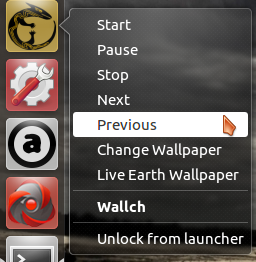
In Unity, you can add custom entries to its launcher via modifying `.desktop`
file, see [Adding shortcuts to a launcher][unity-launcher].
+__Launcher shortcuts of Audacious:__
+
+
+
+[addrecentdocument]:../api/app.md#appaddrecentdocumentpath
+[clearrecentdocuments]:../api/app.md#appclearrecentdocuments
+[setusertaskstasks]:../api/app.md#appsetusertaskstasks
[app-registration]:http://msdn.microsoft.com/en-us/library/windows/desktop/ee872121(v=vs.85).aspx
[unity-launcher]:https://help.ubuntu.com/community/UnityLaunchersAndDesktopFiles#Adding_shortcuts_to_a_launcher
 Repositories / electron.git / commitdiff