-# Desktop environment integration
+# Desktop Environment Integration
-Different operating systems provide different features on integrating desktop
-applications into their desktop environments. For example, on Windows
-applications can put shortcuts in the JumpList of task bar, and on Mac
+Different operating systems provide different features for integrating desktop
+applications into their desktop environments. For example, on Windows,
+applications can put shortcuts in the JumpList of task bar, and on Mac,
applications can put a custom menu in the dock menu.
This guide explains how to integrate your application into those desktop
## Recent documents (Windows & OS X)
Windows and OS X provide easy access to a list of recent documents opened by
-the application via JumpList and dock menu.
+the application via JumpList or dock menu, respectively.
__JumpList:__
<img src="https://cloud.githubusercontent.com/assets/639601/5069610/2aa80758-6e97-11e4-8cfb-c1a414a10774.png" height="353" width="428" >
-To add a file to recent documents, you can use
+To add a file to recent documents, you can use the
[app.addRecentDocument][addrecentdocument] API:
```javascript
app.addRecentDocument('/Users/USERNAME/Desktop/work.type');
```
-And you can use [app.clearRecentDocuments](clearrecentdocuments) API to empty
+You can use [app.clearRecentDocuments](clearrecentdocuments) API to empty
the recent documents list:
```javascript
app.clearRecentDocuments();
```
-### Windows notes
+### Windows Notes
In order to be able to use this feature on Windows, your application has to be
registered as a handler of the file type of the document, otherwise the file
won't appear in JumpList even after you have added it. You can find everything
on registering your application in [Application Registration][app-registration].
-When a user clicks a file from JumpList, a new instance of your application will
-be started with the path of the file added as a command line argument.
+When a user clicks a file from the JumpList, a new instance of your application will be started with the path of the file added as a command line argument.
-### OS X notes
+### OS X Notes
When a file is requested from the recent documents menu, the `open-file` event
-of `app` module would be emitted for it.
+of `app` module will be emitted for it.
-## Custom dock menu (OS X)
+## Custom Dock Menu (OS X)
OS X enables developers to specify a custom menu for the dock, which usually
contains some shortcuts for commonly used features of your application:
app.dock.setMenu(dockMenu);
```
-## User tasks (Windows)
+## User Tasks (Windows)
On Windows you can specify custom actions in the `Tasks` category of JumpList,
as quoted from MSDN:

Unlike the dock menu in OS X which is a real menu, user tasks in Windows work
-like application shortcuts that when user clicks a task, a program would be
+like application shortcuts such that when user clicks a task, a program will be
executed with specified arguments.
To set user tasks for your application, you can use
]);
```
-To clean your tasks list, just call `app.setUserTasks` with empty array:
+To clean your tasks list, just call `app.setUserTasks` with an empty array:
```javascript
app.setUserTasks([]);
## Thumbnail Toolbars
-On Windows, you can add a thumbnail toolbar with specified buttons in a taskbar
-layout of an application window. It provides users a way to access to a particualr
-window's command without restoring or activating the window.
+On Windows you can add a thumbnail toolbar with specified buttons in a taskbar
+layout of an application window. It provides users a way to access to a
+particular window's command without restoring or activating the window.
From MSDN, it's illustrated:
win.setThumbarButtons([]);
```
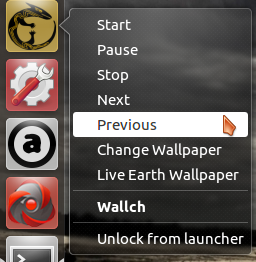
-## Unity launcher shortcuts (Linux)
+## Unity Launcher Shortcuts (Linux)
-In Unity, you can add custom entries to its launcher via modifying `.desktop`
-file, see [Adding shortcuts to a launcher][unity-launcher].
+In Unity, you can add custom entries to its launcher via modifying the `.desktop`
+file, see [Adding Shortcuts to a Launcher][unity-launcher].
__Launcher shortcuts of Audacious:__
-## Progress bar in taskbar (Windows & Unity)
+## Progress Bar in Taskbar (Windows & Unity)
-On Windows, a taskbar button can be used to display a progress bar. This enables
+On Windows a taskbar button can be used to display a progress bar. This enables
a window to provide progress information to the user without the user having to
switch to the window itself.
window.setProgressBar(0.5);
```
-## Represented file of window (OS X)
+## Represented File of Window (OS X)
On OS X a window can set its represented file, so the file's icon can show in
-the title bar, and when users Command-Click or Control-Click on the tile a path
+the title bar and when users Command-Click or Control-Click on the tile a path
popup will show.
You can also set the edited state of a window so that the file icon can indicate
 Repositories / electron.git / commitdiff